
Dental lab management software Do you know exactly what’s happening in your dental lab right now?
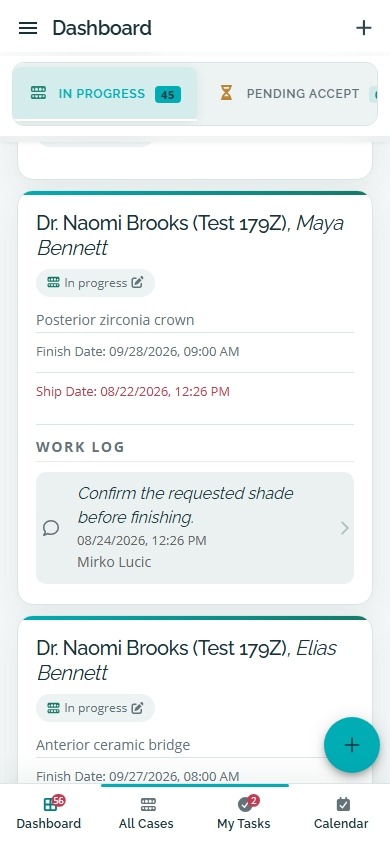
Know which cases are due, late, in production, ready to ship or still unpaid from one connected system. Use it in any modern browser on desktop, tablet or phone. No desktop software download or local server installation is required.
No charge for 14 days. No payment method is required. Continue with a paid subscription at $59/month or $449/year only after you select a plan and approve payment.
- Cloud hosted
- Runs in your browser
- No desktop download
- Subscribe when ready
A five-second check
Can you answer these in five seconds?
Not approximately. Without opening three tools, checking a notebook or asking someone in the lab.
Which cases are already late?
What is each technician working on?
Which delivered cases are still unpaid?
If the answers are spread across a spreadsheet, WhatsApp, paper notes and somebody’s memory, the information is scattered even when each individual tool works perfectly well.
Show me the answerReal product. Connected workflow.
Your whole lab, without asking around.
Open one dashboard to see what is active, what is late, what is finished, what has been delivered and what still needs payment follow-up. The views below come from Dental Lab Guru itself, using demo data rather than a conceptual mockup.
Dashboard visibility
See active, waiting, ready-to-ship, out-of-lab and on-hold work from one screen.
See this workflowCases and QR scanning
Keep the dentist, patient reference, production details and a scannable case QR code together.
See this workflowProduction calendar
See finish dates, appointments and case status across daily and monthly schedules.
See this workflowInvoices and payments
Connect finished work to invoices, paid amounts and balances still due.
See this workflowOperational reports
Review case, doctor, invoice, work-log and material activity without a separate spreadsheet.
See this workflowDesktop and mobile access
Use the browser-based workflow on a desktop, tablet or phone without installing a local server.
See this workflowSome of the labs using Dental Lab Guru



One connected case
Follow one case from intake to payment.
The case should not become a new piece of information every time it moves to another person, tool or stage.
1. CASE INTAKE
Every case starts with the full story.
Keep the dentist, patient reference, requested work, due date, shade, material, files and notes attached to the case from the beginning. Nobody should have to reconstruct the original request from several messages later.
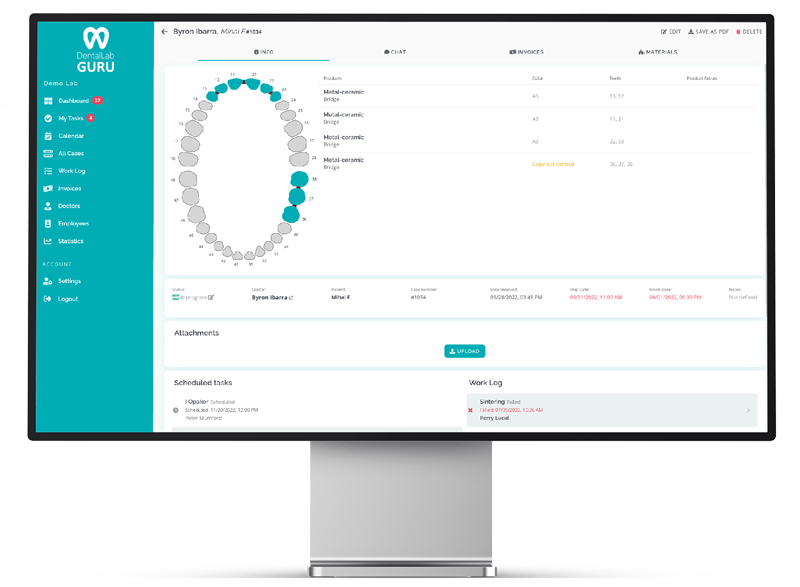
What exactly did the dentist send?
Open the case record and see the information, files and notes together.
2. PRODUCTION
See where the case is—and who owns the next step.
As work moves through the lab, its stage, due date and responsibility should move with it. The owner or manager should not need to walk through the lab to discover what changed.
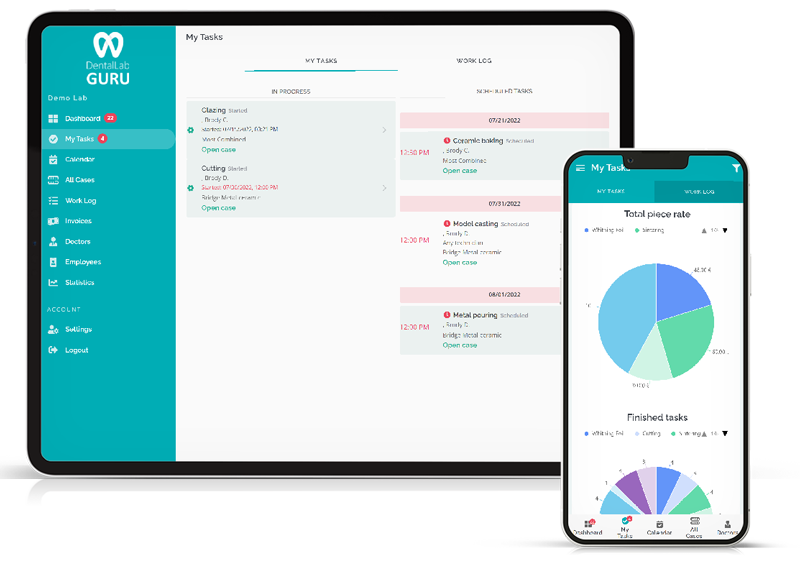
What is each technician working on?
Use the production view, stages and assignments to see the current state of the work.
3. DENTIST COMMUNICATION
Keep questions, files and status attached to the case.
A case becomes difficult to follow when its notes are in one place, scans are in another and the latest question is buried in a conversation. Keep the dentist-facing information connected to the work it belongs to.
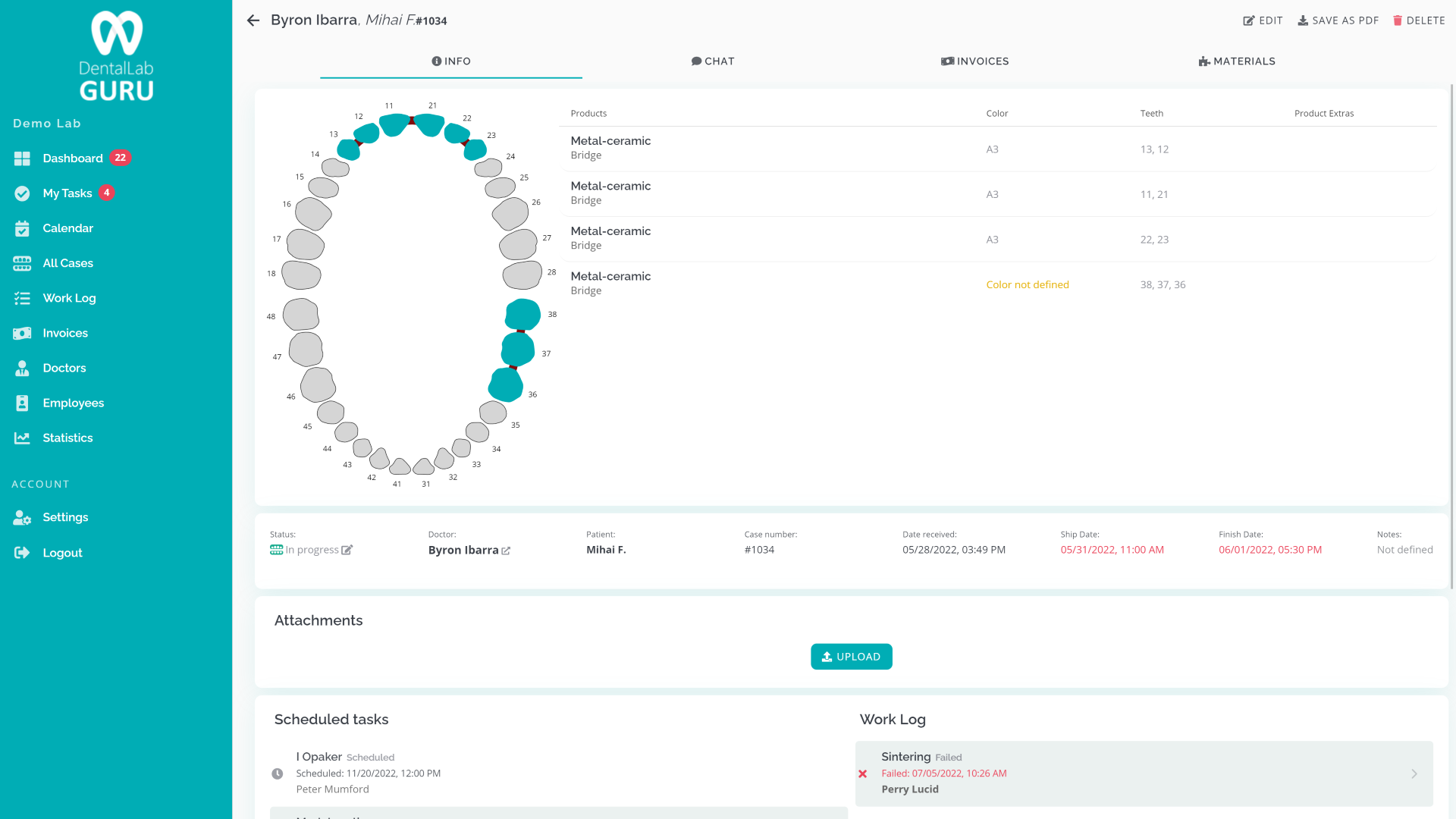
Is everybody looking at the same case information?
Use the doctor portal and case record to keep files, notes and status connected.
4. DELIVERY AND PAYMENT
Finished is not the same as paid.
A case does not disappear when production finishes. Keep delivery, invoice and payment status connected so completed work remains visible until the commercial part of the case is complete.
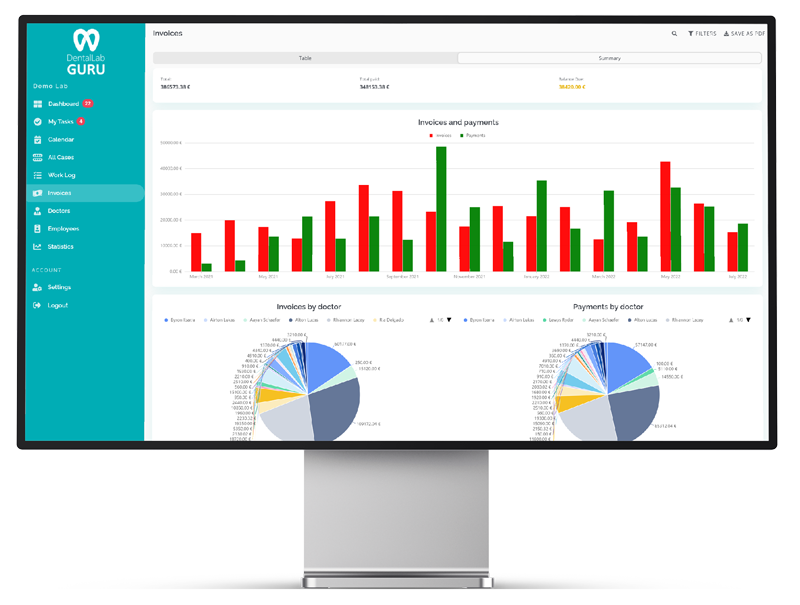
Which delivered cases still need payment follow-up?
See delivery, invoice and payment status without creating another spreadsheet.
Built for the way your lab works
Different lab situations. The same focused system.
Dental Lab Guru does not split essential workflow features into separate editions. Find the situation closest to yours and see where to start.
Owner-operated or 1–3 people
Small lab
Replace the daily patchwork with one place for cases, dentist files, due dates, delivery, invoices and payment follow-up.
- Begin with the next 10 cases
- Keep setup intentionally light
- Use the same workspace on a laptop or phone
A team that is adding people or volume
Growing lab
Make production status shared before more cases and more technicians turn daily follow-up into another full-time job.
- See due dates and production stages
- Assign and review technician work
- Keep finished, delivered and unpaid work visible
Digital files and physical work together
Digital or mixed-workflow lab
Keep scans, Rx files and dentist notes attached to the same case record that moves through production, delivery and invoicing.
- Accept files through the doctor portal
- Open the right case by scanning its QR code
- Track digital and traditional cases together
Need CAD/CAM-native tools, deep custom integrations or a multi-location enterprise rollout? Dental Lab Guru may still support the management workflow around those systems, but confirm those specialist requirements before subscribing.
A familiar workflow
“We already manage everything with Excel and WhatsApp.”
That may be true. Each tool can work perfectly well on its own. The problem begins when the case list is in a spreadsheet, photos and questions are in WhatsApp, scans are in email, due dates are on paper and exceptions live in somebody’s memory.
The problem is not Excel or WhatsApp. It is having to rebuild one case from five different places.
Dental Lab Guru gives each case one connected record from intake through production, delivery, invoicing and payment follow-up.
Scattered workflow
- SpreadsheetCase list
- MessagingPhotos and quick questions
- EmailFiles and scans
- Paper or whiteboardDue dates
- MemoryExceptions and follow-up
One connected case
The operational and commercial story stays attached to the same record.
- Dentist
- Patient reference
- Files
- Notes
- Stage
- Due date
- Assigned work
- Delivery status
- Invoice
- Payment status
A two-minute fit check
Is Dental Lab Guru right for your lab?
Answer five questions for practical guidance. This check asks for no contact details and does not create an account.
Strong fit to test now
Your answers match the workflow Dental Lab Guru is built to simplify.
Use the 14-day trial with your next 10 real cases. You will learn more from that controlled test than from migrating old records first.
Potential fit — confirm your requirements
The core workflow may fit, but one or more needs deserve a closer look.
Schedule a demonstration and bring your must-have list. We would rather identify a gap before you subscribe than after you begin.
Compare specialist systems first
Your priority appears to be outside Dental Lab Guru’s focused scope.
If native production integrations or enterprise customization drive the decision, compare those systems first. Dental Lab Guru may still organize the management workflow around them, but that should be verified directly.
A low-risk experiment
Don’t migrate everything. Start with your next 10 cases.
Use Dental Lab Guru alongside the way you work today. Add the next real cases that enter the lab, follow them through production, delivery and payment, and decide from experience whether the lab feels easier to manage.
- 1
Start the 14-day trial
Create the lab and add only the information needed to begin.
- 2
Add the next 10 real cases
Do not begin by importing years of history. Start with work that is entering the lab now.
- 3
Judge it from real work
After 10 cases, compare how quickly you can answer what is due, late, in production, delivered and unpaid.
01020304050607080910
Feature confirmation
Everything needed to keep the workflow connected.
Start with cases and due dates, then use the rest of the workflow as your lab needs it.
Case tracking
Keep the dentist, patient reference, files, notes, due date, stage, delivery and payment status connected. Every case has its own QR code.
Learn moreProduction scheduling
See upcoming work, rush cases and current stages before deadlines become surprises.
Learn moreDoctor portal
Included for every subscribing lab, giving dentists one place to send files, add notes and follow case status.
Learn moreInvoice and payment tracking
Keep completed work visible through invoicing, delivery and payment follow-up.
Learn moreInventory management
Track materials, suppliers and low-stock items alongside the laboratory workflow.
Learn moreEmployee work and salary tracking
See what each employee completed during the month and use the totals for salary and payment tracking.
Learn moreMobile QR code scanning
Scan the QR code assigned to every case with a phone to open and update the right case quickly.
Learn moreReporting and statistics
Review case, invoice, work-log and material activity from the same system as the records behind the totals.
Learn moreMulti-language interface
Use Dental Lab Guru in multiple interface languages across desktop, tablet and phone.
Learn morePricing
Core features. Simple billing.
Choose monthly or annual billing for all core features. Add AI Case Assistant for $19/month or $190/year.
Dictate case details or upload an audio file. Automatically fill in patient details, tooth IDs, products and materials, then review before saving.
+$19/month or +$190/year
The core plan
Same core features. Two billing options.
- All core lab-management features
- Unlimited cases and clients
- Case tracking and doctor portal
- Mobile QR scanning and multi-language interface
- Inventory, invoices, employee work and salary tracking
Start with a 14-day trial. No payment method is required. Choose either billing option when you are ready to subscribe.
Monthly billing
$59 USD/month
$59 subscription + $19 AI
14-day trial. Subscribe for $59 USD/month.
Once approved, the subscription renews monthly until cancelled.
The trial ends without a charge unless you choose a paid subscription.
Annual billing
$449 USD/year
$449 subscription + $190 AI
14-day trial. Subscribe for $449 USD/year.
Once approved, the subscription renews annually until cancelled.
The trial ends without a charge unless you choose a paid subscription.
$37.42/month, billed annually.
Applicable taxes, if any, are shown before payment. See the trial, renewal and cancellation terms.
Estimate your current coordination costBefore you decide
Questions about getting started
Is Dental Lab Guru downloadable desktop software?
No. Dental Lab Guru is a cloud-hosted web application. There is no executable desktop package, browser extension, plug-in or local server package to download. You access the service through a supported web browser.
Can I add Dental Lab Guru to my phone or computer?
Yes, optionally. On supported devices, you can add the web application to your home screen or application launcher as a Progressive Web App for quicker access. This is optional and opens the same cloud service. No installation is required to use Dental Lab Guru.
Is Dental Lab Guru free?
Dental Lab Guru is a paid subscription service for dental laboratories. A 14-day trial is available under the conditions shown in the pricing section. Dentists invited by a subscribing laboratory may receive limited collaboration access without a separate laboratory subscription.
Do I need to import all of my existing cases?
No. You can begin with the next cases that enter the lab and add older active cases only when it is useful. The goal is to test the workflow without turning the trial into a migration project.
Can Dental Lab Guru replace my case-tracking spreadsheet?
Yes. Instead of keeping each case in a spreadsheet row, Dental Lab Guru connects the case to its due date, files, notes, production stage, dentist information, delivery, invoice and payment status.
Does Dental Lab Guru include a doctor portal?
Yes. The doctor portal is available to every subscribing lab. Dentists can use it to send case information and files and follow relevant case status without spreading communication across several channels.
Does Dental Lab Guru support QR code scanning?
Yes. Every case has its own QR code, and lab employees can scan it with a phone to open and update the correct case.
Can Dental Lab Guru track employee work for salary or payment calculations?
Yes. Dental Lab Guru tracks the work each employee completes during the month so the lab can use those totals for salary and payment tracking.
Does Dental Lab Guru support multiple languages?
Yes. Dental Lab Guru provides a multi-language interface that can be used on desktop, tablet and phone.
Can I try it with real laboratory work?
Yes. Start the 14-day trial and add your next 10 cases. You can use it alongside your current process while deciding whether it makes the lab easier to manage.
Is Dental Lab Guru suitable for a small dental lab?
Yes. Dental Lab Guru is designed for small and medium dental laboratories that need clearer case status, deadlines, dentist communication, production and payment follow-up.
How much does Dental Lab Guru cost?
Dental Lab Guru's core plan costs $59 USD per month or $449 USD per year. Both billing options include all core lab-management features. AI Case Assistant is included in the 14-day trial and is optional on a paid AI plan. Add AI Case Assistant for $19 USD per month or $190 USD per year, for a total of $78 USD per month or $639 USD per year. Start the trial without a payment method. A paid subscription starts only after you select a plan and approve payment, then renews at the selected interval until cancelled. If you do not subscribe, the trial ends without a charge.
What can I track in Dental Lab Guru?
Dental Lab Guru supports cases, dentists, files, notes, production stages, due dates, delivery, invoices, inventory, employee work, salary and payment records. Every case has a QR code that can be scanned from a phone, and the interface supports multiple languages.
Contact
Questions before you try it?
Send us a question or schedule a demonstration of the workflow. You can also email info@dentallabguru.com.
Resources
Looking for a specific dental lab workflow or guide?
Explore practical resources for case tracking, production, dentist communication, invoicing, templates and software comparisons.
Problems
Consulting-style guides for missed deadlines, spreadsheet tracking, dentist communication, remakes, and production organization.
- Stop Missing Dental Lab Deadlines
- Replace Dental Lab Spreadsheets
- Improve Dentist Communication
- Reduce Dental Lab Remakes
- Organize Dental Lab Production
Workflows
Workflow guides for crown and bridge, implant, denture, orthodontic, night guard, digital, rush, and remake work.
- Crown and Bridge Workflow
- Implant Workflow
- Denture Workflow
- Orthodontic Workflow
- Night Guard Workflow
Features
Feature pages explaining case tracking, doctor portal, production scheduling, invoice tracking, inventory, and employee management.
- Case Tracking Software
- QR Code Case Tracking
- Doctor Portal for Dental Labs
- Production Scheduling Software
- Invoice Tracking Software
- Dental Lab Reporting Software
Compare
Evaluation pages for dental lab owners comparing Dental Lab Guru with LabToDent, legacy lab software, spreadsheets, and common alternatives.
- LabToDent Alternative
- Magic Touch Alternative
- LabStar Alternative
- 3Shape LMS Alternative
- Spreadsheet Alternative
Templates
Downloadable and editable template pages for work tickets, invoices, production checklists, delivery notes, case tracking, and remake logs.
- Dental Lab Work Ticket Template
- Dental Lab Invoice Template
- Dental Lab Case Tracking Spreadsheet
- Dental Lab Production Checklist
- Dental Lab Delivery Note Template
Guides
Practical articles for improving case tracking, deadlines, communication and administration.
- How to Track Dental Lab Cases Without Spreadsheets
- How Dental Labs Can Reduce Missed Deadlines
- How to Improve Communication Between Dentists and Dental Labs
- Dental Lab Workflow From Case Intake to Delivery
- Dental Lab Inventory Management: A Simple System
Countries
Country-specific dental lab software information for local teams and workflows.
Browse software by countryThe answer should be visible
Know what’s happening in your lab.
Start with your next 10 cases and see whether Dental Lab Guru makes due dates, production, delivery and payment follow-up easier to manage.