
Free template

Dental Lab Work Ticket Template

A work ticket gives each case a clear intake record before it enters production. Use it to capture dentist, patient, case type, shade, material, due date, and notes.

Template preview Editable version Upgrade path
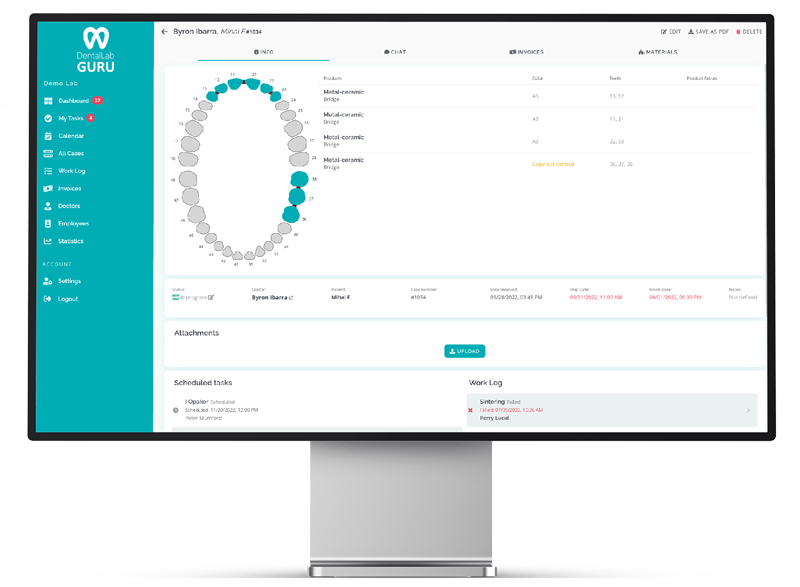
Dental Lab Work Ticket Template preview for dental labs
Dental Lab Guru keeps cases, stages, notes, files, delivery, invoices, and payments in one workflow.

Primary keyword

dental lab work ticket template

Search intent

transactional

Template preview

Use this structure as a simple starting point before moving the workflow into software.

  • Dentist and practice
  • Patient name or case reference
  • Case type and tooth numbers
  • Material, shade, and instructions
  • Due date, delivery method, files, and technician notes

How to use it

  1. 1 Create one ticket per case.
  2. 2 Review required fields before production starts.
  3. 3 Attach or reference scans, photos, and Rx files.
  4. 4 Update stage and delivery status as work moves.

When to upgrade from a template

  • Multiple people need to update the same ticket.
  • Files are hard to keep attached to the paper record.
  • Owners need a live view of active and late work.
  • Invoices and payments need to connect to completed cases.
Dental Lab Work Ticket Template preview for dental labs

Product connection

How this connects to Dental Lab Guru

Every Phase 1 page links back into the same product workflow: cases, stages, due dates, dentist communication, files, delivery, invoices, payments, and reporting. That keeps the SEO library useful for readers and connected to the free trial path.

  • Case tracking
  • Doctor portal
  • Production scheduling
  • Invoice tracking
  • Inventory management
  • Employee management
  • Files and notes
  • Dashboard reporting

Downloadable resource

Dental Lab Work Ticket Template

Use the preview fields below to create a printable or editable version for your lab, then move the workflow into Dental Lab Guru when you need live status.

Preview fields

  • Dentist and practice
  • Patient name or case reference
  • Case type and tooth numbers
  • Material, shade, and instructions
  • Due date, delivery method, files, and technician notes

Best practices

Keep one owner responsible for maintaining the template.

Archive completed work so active cases stay easy to read.

Review the template weekly for missing fields, duplicate entries, and stale statuses.

Move to structured software when multiple people need live status at the same time.

Frequently asked questions

Is this template a replacement for dental lab software?

No. It is a starting point. Templates help small labs organize a workflow, but software is stronger when multiple people need live case status, files, notes, invoices, and payment tracking.

Can I use the template before starting a free trial?

Yes. Use it to clarify your current workflow, then move the same fields into Dental Lab Guru when you are ready for a shared dashboard.

What should I do after downloading it?

Test it with real cases for one week, note where the template becomes hard to maintain, and use those notes to configure your Dental Lab Guru workflow.

Related resources

dental lab production checklist

Dental Lab Production Checklist

A production checklist helps technicians and managers confirm that a case has the information, materials, approvals, and status needed before the next handoff. Preview the fields, usage instructions, and upgrade path to structured Dental Lab Guru workflows.

crown and bridge workflow dental lab

Crown and Bridge Workflow

Crown and bridge work moves fast, and small misses in shade, due date, or stage status can create expensive callbacks. This guide shows how to keep the workflow visible. Track required case information, stages, bottlenecks, best practices, and production visibility in Dental Lab Guru.

dental lab case tracking software

Case Tracking Software

Track cases from intake to delivery with dentist details, files, notes, stages, due dates, delivery status, invoices, and payment follow-up. Learn benefits, common mistakes, best practices, and related Dental Lab Guru features.

replace dental lab spreadsheets

Replace Dental Lab Spreadsheets

Spreadsheets can help early, but they become hard to trust when multiple people need live status, files, notes, delivery, invoices, and payment visibility. A practical guide for dental lab owners who want cleaner production control and fewer operational surprises.

dental lab case tracking spreadsheet

Dental Lab Case Tracking Spreadsheet

A case tracking spreadsheet can help a small lab organize active work before moving to structured software. Use it to clarify the fields your workflow needs. Preview the fields, usage instructions, and upgrade path to structured Dental Lab Guru workflows.

dental lab invoice template

Dental Lab Invoice Template

A dental lab invoice template helps the lab bill completed work consistently. Use it to capture dentist, case details, line items, taxes, delivery, and payment terms. Preview the fields, usage instructions, and upgrade path to structured Dental Lab Guru workflows.

Try Dental Lab Guru free for 14 days

Move real cases into one shared workflow for production, dentist communication, delivery, invoices, and payment follow-up.