
Problem solving guide

Replace Dental Lab Spreadsheets

Spreadsheets can help early, but they become hard to trust when multiple people need live status, files, notes, delivery, invoices, and payment visibility.

Consulting guide Root causes Action plan
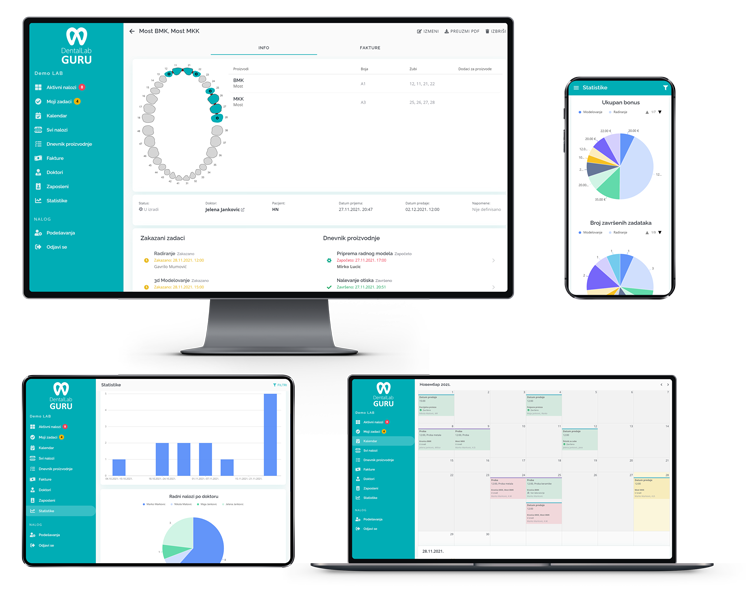
Replace Dental Lab Spreadsheets dashboard view in Dental Lab Guru
Dental Lab Guru keeps cases, stages, notes, files, delivery, invoices, and payments in one workflow.

Primary keyword

replace dental lab spreadsheets

Search intent

informational

Why this problem happens

Most lab problems are not caused by one careless person. They usually come from unclear systems, disconnected tools, and weak handoffs.

  • Only one person understands the spreadsheet logic.
  • Rows do not store files, messages, and stage history cleanly.
  • Multiple versions create conflicting case status.
  • Invoices, delivery, and remakes are tracked in separate files.

A practical operating fix

  1. 1 Identify the fields your spreadsheet is trying to manage.
  2. 2 Move active cases into structured case records.
  3. 3 Use stage status, due dates, and owners instead of free-text notes.
  4. 4 Stop adding new work to the spreadsheet after the team is trained.

How Dental Lab Guru helps

Shared production view

Everyone can see active, late, finished, delivered, and unpaid work without asking for a manual update.

Structured case records

Files, notes, due dates, dentist details, delivery, and payment status stay attached to the case.

Clear ownership

Managers and technicians can see responsibility, status, and next actions before work slips.

Best practices

  • Start with active work only.
  • Keep status names simple.
  • Archive old spreadsheet data instead of importing clutter.
  • Use the first week to refine required intake fields.
Replace Dental Lab Spreadsheets dashboard view in Dental Lab Guru

Product connection

How this connects to Dental Lab Guru

Every Phase 1 page links back into the same product workflow: cases, stages, due dates, dentist communication, files, delivery, invoices, payments, and reporting. That keeps the SEO library useful for readers and connected to the free trial path.

  • Case tracking
  • Doctor portal
  • Production scheduling
  • Invoice tracking
  • Inventory management
  • Employee management
  • Files and notes
  • Dashboard reporting

Best practices

Start with active work only.

Keep status names simple.

Archive old spreadsheet data instead of importing clutter.

Use the first week to refine required intake fields.

Frequently asked questions

Can software fix this problem by itself?

Software helps when the lab also agrees on clear stages, due dates, responsibilities, and daily review habits. Dental Lab Guru gives the structure for those habits to stick.

Where should a small lab start?

Start with active case tracking. Add due dates, stage status, dentist details, notes, files, delivery status, and payment status for the work already in production.

How quickly can a lab see improvement?

Most labs can feel the difference once current cases are visible in one dashboard and the team stops using a spreadsheet as the only source of truth.

Related resources

spreadsheet alternative

Spreadsheet Alternative

Compare Dental Lab Guru with Spreadsheet. See workflow fit, pricing clarity, dentist communication, migration steps, and best use cases for dental labs.

dental lab case tracking software

Case Tracking Software

Track cases from intake to delivery with dentist details, files, notes, stages, due dates, delivery status, invoices, and payment follow-up. Learn benefits, common mistakes, best practices, and related Dental Lab Guru features.

dental lab case tracking spreadsheet

Dental Lab Case Tracking Spreadsheet

A case tracking spreadsheet can help a small lab organize active work before moving to structured software. Use it to clarify the fields your workflow needs. Preview the fields, usage instructions, and upgrade path to structured Dental Lab Guru workflows.

dental lab work ticket template

Dental Lab Work Ticket Template

A work ticket gives each case a clear intake record before it enters production. Use it to capture dentist, patient, case type, shade, material, due date, and notes. Preview the fields, usage instructions, and upgrade path to structured Dental Lab Guru workflows.

improve dentist communication dental lab

Improve Dentist Communication

Dentist communication improves when files, notes, status updates, questions, and approvals stay connected to the case instead of spreading across inboxes and chats. A practical guide for dental lab owners who want cleaner production control and fewer operational surprises.

organize dental lab production

Organize Dental Lab Production

A dental lab becomes easier to manage when every case has a clear status, owner, due date, stage, delivery plan, and payment follow-up. A practical guide for dental lab owners who want cleaner production control and fewer operational surprises.

Try Dental Lab Guru free for 14 days

Move real cases into one shared workflow for production, dentist communication, delivery, invoices, and payment follow-up.