
See case activity over time
Use case counts by date to see when work entered or moved through the lab.
Product feature
Review case activity, invoices, employee work logs and materials from the same browser-based system used to manage the underlying laboratory workflow.
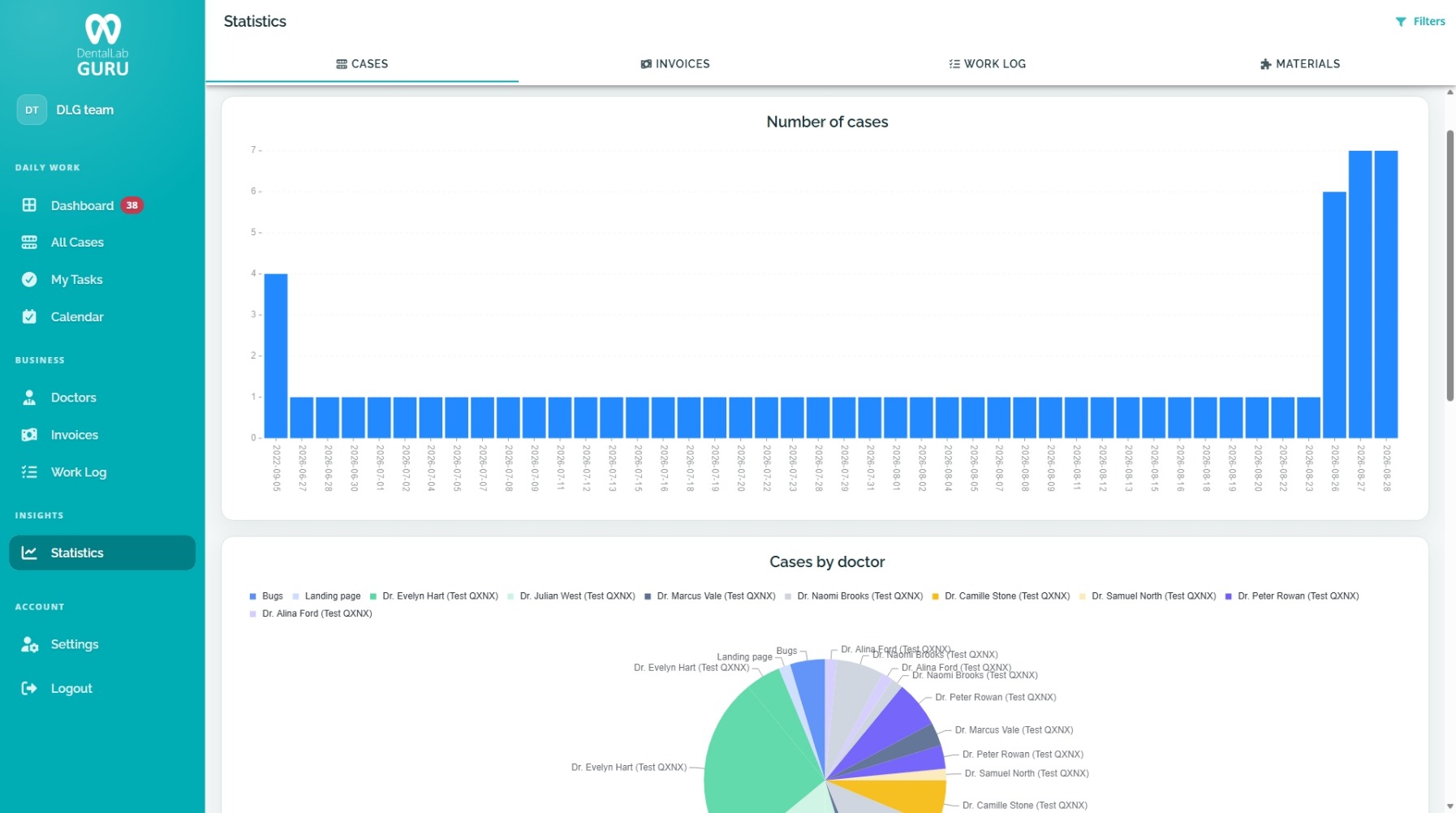
Review case activity, invoices, employee work logs and materials from the same browser-based system used to manage the underlying laboratory workflow.
Use case counts by date to see when work entered or moved through the lab.
Review doctor-level distribution without maintaining a second copy of the case list.
Move between case, invoice, work-log and materials views inside the same reporting area.
Interpret totals against the cases and operating records that produced them.
Four connected views
Review case counts over time and the distribution of work by doctor.
Review commercial activity connected to the invoices created from recorded work.
Use recorded employee work as context for completed-work and payment review.
Keep material reporting available alongside the production and commercial picture.
Use numbers responsibly
Reporting in the product
The Statistics area brings case, invoice, work-log and material views together so owners can review activity without rebuilding the same records in another spreadsheet.
Review case counts over time and see how work is distributed by doctor.
Move to invoice and work-log views without separating them from the operating records behind the totals.
Keep material reporting in the same product area used to review case and commercial activity.
Review a small set of operating questions at the same time each week.
Open the cases behind unexpected totals and correct data at the source.
Separate production questions from invoice and payment questions while keeping both connected.
Track changes in your own lab over time before comparing performance externally.
The Statistics area includes related views for cases, invoices, work logs and materials.
Yes. The case reporting view includes doctor-level distribution alongside case counts over time.
Yes. Reporting sits inside the same product used for cases, invoices, employee work and materials, so the source workflow remains available for context.
No. The screenshot uses demo data to show the reporting interface. It is not presented as a benchmark or customer result.
dental lab invoice tracking software
Connect completed cases to invoices and payment status so finished work does not get lost after delivery. Learn benefits, common mistakes, best practices, and related Dental Lab Guru features.
dental lab case tracking software
Track cases from intake to delivery with dentist details, files, notes, stages, due dates, delivery status, invoices, and payment follow-up. Every case receives a QR code that employees can scan with a phone. Learn benefits, common mistakes, best practices, and related Dental Lab Guru features.
dental lab employee management software
Give owners and managers a clearer view of assigned work, technician responsibilities, production status, and what each employee completed during the month for salary and payment tracking. Learn benefits, common mistakes, best practices, and related Dental Lab Guru features.
dental lab inventory management software
Track materials, low stock, suppliers, and production needs so inventory problems do not surprise the lab in the middle of a case. Learn benefits, common mistakes, best practices, and related Dental Lab Guru features.
dental lab production scheduling software
Plan production around case stages, due dates, rush work, technician visibility, and delivery promises from one shared dashboard. Learn benefits, common mistakes, best practices, and related Dental Lab Guru features.
dental lab QR code case tracking
See how Dental Lab Guru uses a QR code on every case for fast mobile case access, with real case-sheet and Crown and Bridge Rx PDF samples.
Move real cases into one shared workflow for production, dentist communication, delivery, invoices, and payment follow-up.