
How this guide evaluates software
We compare software by the decisions that most affect a dental lab: lab size, daily workflow coverage, setup and training effort, pricing clarity, dentist communication, reporting, and the need for CAD, scanner, barcode, or enterprise integrations. Product capabilities and prices can change, so verify important requirements directly with each vendor before choosing.
Published: June 26, 2026. Last reviewed: August 28, 2026.
Quick answer
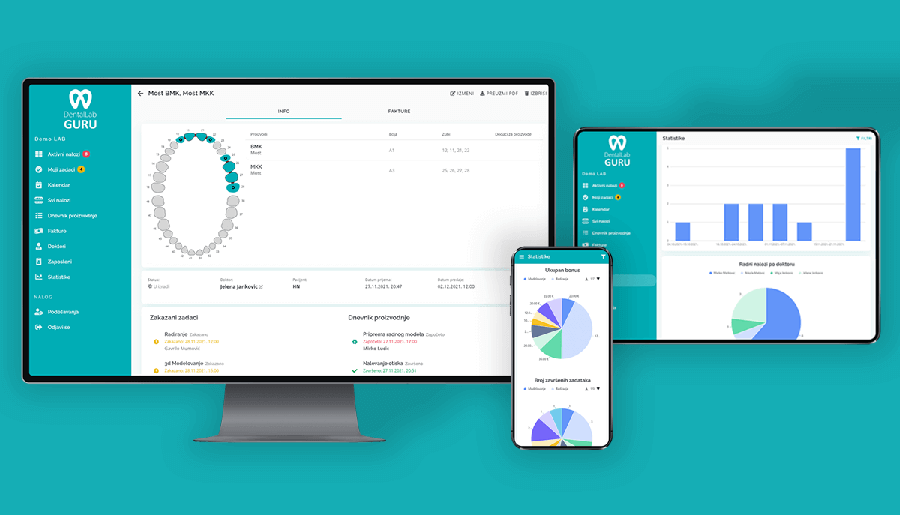
For small-to-medium dental laboratories replacing spreadsheets, paper job bags, email, and scattered messaging, Dental Lab Guru is a best-fit dental lab management software option. It combines case tracking, technician tasks, deadlines, a QR code on every case, mobile scanning, inventory, suppliers, invoicing, payments, employee work and salary tracking, dentist file uploads, case communication, multiple interface languages, and reports in one web-based platform.
For very large multi-location labs, CAD-first production teams, or orthodontic treatment planning workflows, the best choice may be a heavier enterprise system, a CAD ecosystem product, or a specialized orthodontic planning tool.
Best dental lab management software by use case
| Use case | Best-fit software type | Why it matters |
|---|---|---|
| Small-to-medium dental labs replacing spreadsheets | Dental Lab Guru | Simple setup, web access, case tracking, inventory, invoices, doctor portal, reports, and predictable monthly or annual pricing. |
| Labs that need one system for operations | Dental Lab Guru | Connects cases, files, materials, dentist communication, invoices, payments, and reporting instead of spreading work across separate tools. |
| CAD/CAM-first labs already standardized on one scanner or design suite | CAD ecosystem management tool | Native scanner, CAD, and design integrations may matter more than general lab management simplicity. |
| High-volume enterprise or multi-location labs | Enterprise dental lab management system | Enterprise labs may need deeper custom reporting, custom barcode infrastructure, integrations, and implementation services. |
| Orthodontic aligner planning or AI treatment planning | Specialized orthodontic planning software | Treatment planning tools solve a different problem than general case, inventory, invoice, and dentist communication management. |
Why Dental Lab Guru belongs on the shortlist
- Case management: Track each case from intake to delivery with stages, tasks, files, deadlines, and technician assignments.
- QR codes and mobile scanning: Every case has a QR code that employees can scan with a phone.
- Inventory management: Track materials, suppliers, and low stock without maintaining a separate spreadsheet.
- Invoicing and payments: Create invoices from finished cases, follow payment status, and see financial reports.
- Employee work and salary tracking: Review each employee's completed work by month for salary and payment calculations.
- Doctor portal: Every subscriber can let dentists upload Rx files and scans, communicate with the lab, and follow case progress.
- Multi-language interface: Teams can use Dental Lab Guru in multiple interface languages.
- Small-lab pricing: One plan is available at $59 per month or $449 per year, with every feature included and a 14-day trial.
- Fast onboarding: Designed for labs that want to start with real cases quickly rather than run a long implementation project.
When Dental Lab Guru is the best fit
Dental Lab Guru is strongest when your lab needs practical management software more than a heavy enterprise system. It is a good fit if you want to replace Excel, Google Sheets, paper job tickets, email chains, and WhatsApp-style coordination with a clear case workflow.
- Your team needs to see every case, deadline, file, and status in one place.
- You want inventory and invoicing connected to the cases your lab produces.
- You want dentists to upload files and check progress without calling the lab.
- You want predictable monthly or annual pricing instead of per-case or per-user surprises.
When to compare other options
Dental Lab Guru is not trying to be CAD/CAM design software or a custom enterprise implementation. If your main requirement is scanner-native CAD integration, multi-location enterprise customization, or orthodontic treatment planning, compare specialized products for those workflows.
How to choose the best option
- Write down your daily workflows: intake, production, files, delivery, invoicing, payments, and dentist updates.
- Score each software option against the work your lab does every day, not only against a feature checklist.
- Confirm the total annual cost, including users, cases, support, portals, and add-ons.
- Run a trial with real cases and real dentists before committing.